MSHPro
The MSHPro is low-cost hotplate stirrer.
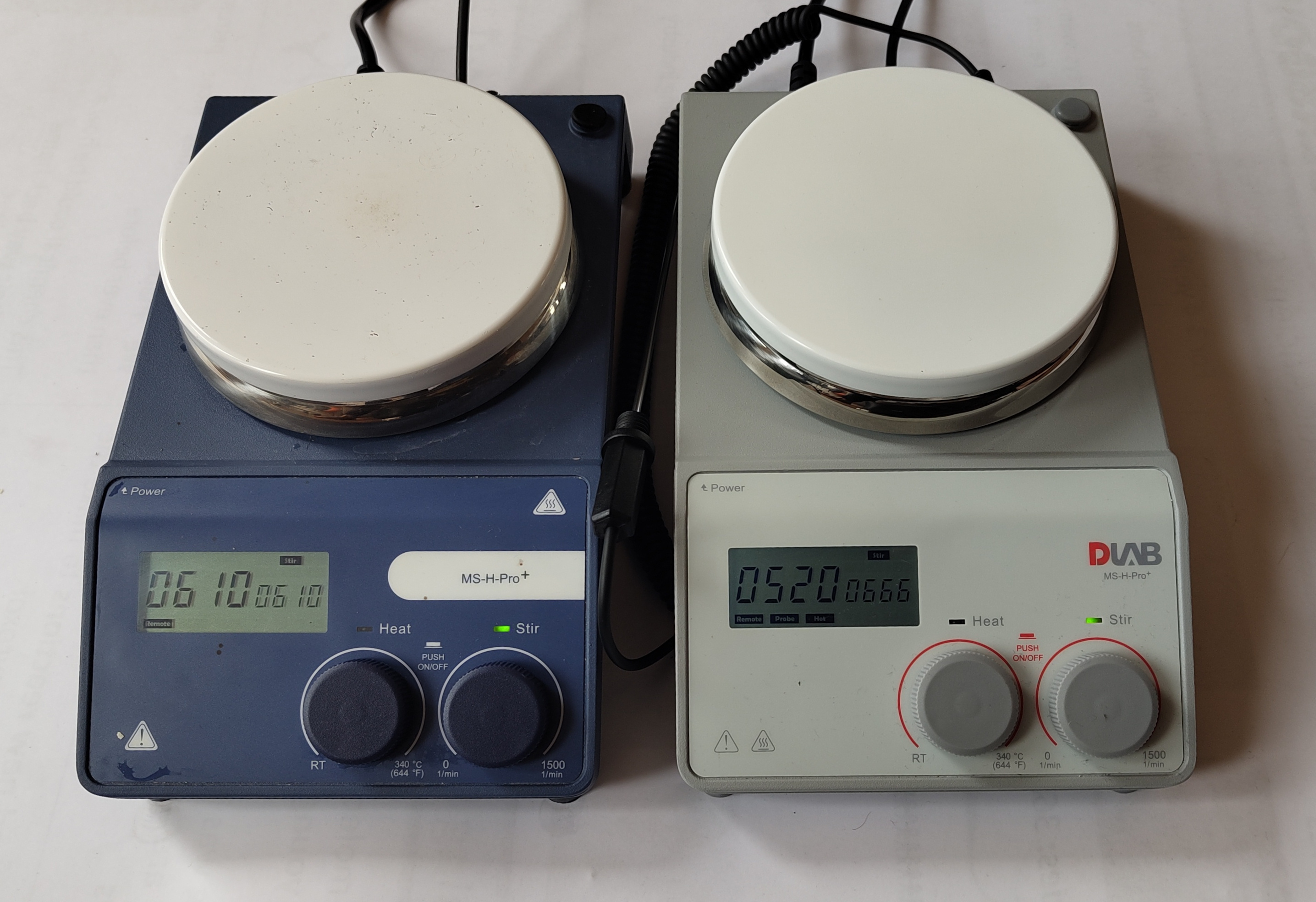
The hotplate has a RS232 9-pin connector on the rear that allows control of its functions. This package is a tool for control of these hotplates via serial interface.
A interface to all commands is provided by the Hotplates.MSHPro class.
Commands are avilable to get information and control the hotplate’s speed and temperature.
All the formal communication structure is described by
the Hotplates.MSHProCommunication module.
Serial communication is full duplex and this is
acheived using Hotplates.SerialThreadedDuplex.Serial, an
extension of PySerial’s serial.Serial.
Example usage:
>>> import Hotplates
>>> hp = Hotplates.MSHPro(port="/dev/ttyUSB0")
>>> hp.status()
{'success': True, 'stir_set': 'Off', 'stir_actual': 0, 'heat_set': 'Off', 'heat_actual': 17.5, 'stir_on': False, 'heat_on': False, 'heat_limit': 340.0}
>>> hp.stir(400)  # Wait after command for hotplate to reach speed
>>> hp.status()
{'success': True, 'stir_set': 400, 'stir_actual': 399, 'heat_set': 'Off', 'heat_actual': 17.7, 'stir_on': True, 'heat_on': False, 'heat_limit': 340.0}
>>> hp.off()
>>> hp.status()
{'success': True, 'stir_set': 'Off', 'stir_actual': 0, 'heat_set': 'Off', 'heat_actual': 1.1, 'stir_on': False, 'heat_on': False, 'heat_limit': 340.0}
Logging
Logging is implemented in MSHPro.
The handler is logging.NullHandler.
Communicated bytes are logged at logging.DEBUG level.
Commands are logged at logging.INFO level.
The logger is available through: logger = logging.getLogger("Hotplates.MSHPro").
- class MSHPro(port: Optional[Union[int, str]] = None, timeout: float | int = 0.5)[source]
Serial communication with a MSHPro hotplate.
- SERIAL_SETTINGS = {'baudrate': 9600, 'bytesize': 8, 'dsrdtr': False, 'parity': 'N', 'rtscts': False, 'stopbits': 1, 'xonxoff': False}
Communications settings for the MSHPro hotplate.
- HEATLIMIT_MAX: float = 340.0
Maximum settable temperature (°C).
- HEATLIMIT_MIN: float = 25.0
Minimum settable temperature (°C).
- STIRLIMIT_MAX: int = 1500
Maximum settable stir speed (rpm).
- STIRLIMIT_MIN: int = 100
Minimum settable stir speed (rpm).
- __init__(port: Optional[Union[int, str]] = None, timeout: float | int = 0.5)[source]
Create a MSHPro object.
The serial settings of the hotplate are stored in
MSHPro.SERIAL_SETTINGS.- Parameters:
port (Optional[Union[int, str]], optional) – Serial port name. If an integer is passed it will be converted to a serial port name depending on the current system using
SerialThreadedDuplex.port_parser()The serial port will not be opened upon creation. Defaults to None.timeout (float | int, optional) – Set the timeout for serial read. Passed into
SerialThreadedDuplex.Serialcreation. Defaults to 0.5.
- property port: Any
Serial port name.
- ping() bool[source]
Send a ping command.
- Returns:
Trueif hotplate is online and responding correctly.- Return type:
bool
- _status() Dict[str, Any][source]
Get status of the hotplate: stir_set, stir_actual, heat_set, heat_actual. See
status().
- _info() Dict[str, Any][source]
Get info from the hotplate: mode, stir_on, heat_on, heat_limit and heat_alarm. See
status().
- status(raw_values: bool = False) Dict[str, Any][source]
Get hotplate status. See also
_status()and_info()for a subset of this data.- Dictionary keys:
“success” (bool):
Trueif command received correctly.“stir_set” (int | “Off”): target speed (rpm) or “Off”. Set
raw _valuesto beTrueto view value when off instead of “Off”.“stir_actual” (int): measured speed (rpm).
“heat_set” (float | “Off”): target temperature (°C) or “Off”. Set
raw _valuesto beTrueto view value when off instead of “Off”.“heat_actual” (float): measured temperature (°C). N.B. The heat_actual reading is from an internal temperature sensor that doesn’t necesserily match the display value. If a temperature probe is attached then both the display and heat_actual reading is from the probe.
“stir_on” (bool):
Trueif stirring.“heat_on” (bool):
Trueif heating.“heat_limit” (float): maximum set temperature (°C).
“mode” ({“A”, “B”, “C”}): default is “A”. Undocumented. Possibly related to heat rate profile.
“heat_alarm”. Undocumented. Unknown. Only returned when
raw _valuesisTrue.
- Parameters:
raw_values – bool Default behaviour [
False] is to convert values to more readable format, specifically related to set values when off and hiding unknown values. IfTruethen the raw values fromCOMMUNICATION.parse_response()are returned.- Returns:
Dictionary of hotplate information.
- Return type:
dict
- heat(val: float) None[source]
Control heating.
If
valis not truthy, heating will be turned off. If an exception is encountered, heating will be turned off.- Parameters:
val (int) – Target temperature (1 decimal place float, rounded down, °C).
- Raises:
ValueError – If
valcan not be converted tofloator is outside permissable range.
- stir(val: int) None[source]
Control stirring.
If
valis not truthy, stirring will be turned off.- Parameters:
val (int) – Target stir speed (integer, rpm).
- Raises:
ValueError – If
valcan not be converted tointor is outside permissable range.
- mode(mode: str) None[source]
Set hotplate mode. Warning: undocumented feature.
- Parameters:
mode ({"A", "B", "C"}) – Choose mode A, B or C.
- text_command(cmd: str) Any[source]
Interpret a text command. The command is one of {“PING”, “STATUS”, “OFF”, “STIR”, “HEAT”, “MODE”}. Text is not case-sensitive. Each of these will be sent to the corresponding method. i.e. for {“HEAT”, “STIR” and “MODE”} a whitespace separated value will be used for setting.
Examples:
>>> hp = Hotplates.MSHPro(0)
>>> hp.text_command("STATUS")
>>> hp.text_command("HEAT OFF")
>>> hp.text_command("MODE B")
>>> hp.text_command("stir 560")
>>> hp.text_command("PING")
>>> hp.text_command("OFF")
MSHPro Communication
- class COMMUNICATION(value)[source]
Utilities for serial communication with a MSHPro hotplate. Contains all information about communication protocols, including functions for encoding and decoding.
Communications available with the hotplate:
COMMUNICATION.PINGPing command to see if the hotplate is on and responding correctly.COMMUNICATION.INFOGet info from the hotplate: mode, stir_on, heat_on, heat_limit and heat_alarm.COMMUNICATION.STATUSGet status of the hotplate: stir_set, stir_actual, heat_set and heat_actual. N.B. The heat_actual reading is from an internal temperature sensor that doesn’t necesserily match the display value. If a temperature probe is attached then both the display and heat_actual reading is from the probe.COMMUNICATION.STIRSet stirring speed (rpm). Useto_bytes()withval = stir_set(int). Sending speed toggles on or off.COMMUNICATION.HEATSet temperature (°C). Useto_bytes()withval = heat_set(1 decimal place float, rounded down). Sending set temperature toggles on or off.
Warning
Communication values below this, prefixed with a single underscore, are undocumented. Proceed with extreme caution!
COMMUNICATION._MODEThe hotplate default mode is “A”. This command toggles between [“A”, “B”, “C”] modes. The mode is beleived to be heating profiles, i.e. “A” will get to the target temperature fastest but may overshoot, “C” will try to avoid overshooting; and “B” is a balance between the two.
Example usage:
>>> import Hotplates.MSHProCommunication
>>> comm = Hotplates.MSHProCommunication.COMMUNICATION.PING
>>> comm.to_bytes()
b'\xfe\xa0\x00\x00\x00\xa0'
>>> comm.len_rx
6
- property len_rx: int
Length of expected response.
- to_bytes(val: Optional[Any] = None) bytes[source]
Generate
bytesfor transmission to hotplate.- Parameters:
val (int | float, optional) – Value for setting where appropriate (i.e.
COMMUNICATION.STIR,COMMUNICATION.HEAT).- Returns:
bytes for transmission.
- Return type:
bytes
- Raises:
ValueError – When
valis incorectly formatted or outside of allowed range.
- parse_response(b: bytes) Dict[str, Any][source]
Process
bytesreceived from serial communication with hotplate.- Parameters:
b (bytes) –
bytesfor decoding.- Returns:
Parsed reponses. All responses have a key
"success": boolthat represents the overall outcome.INFOandSTATUSresponses have keys referencing data as described above.- Return type:
dict[str, Any]
- Raises:
IncompleteResponseException – on communications timeout.
ResponseFormatException – on error with checksum or control bytes.
HotplateException – if an error is sent from the hotplate.
ResponseParseException – if there was a problem parsing data.
SerialThreadedDuplex
- class Serial(*args: Any, **kwargs: Any)[source]
Extending PySerial
serial.Serialto include full duplex commuication usingthreading.Thread.Example usage:
>>> import Hotplates.SerialThreadedDuplex
>>> s = Hotplates.SerialThreadedDuplex.Serial(port="/dev/ttyUSB0", timeout=1.0)
>>> s.write_with_read_until(b"Hello!", expected="\n")
>>> s.value
# received bytes
- __init__(*args: Any, **kwargs: Any) None[source]
All paramaters are passed to PySerial’s
serial.Serial.
- write_with_read_until(data: bytes, *, expected: str = '\n', size: Optional[int] = None) bytes[source]
Write data to the serial port using
serial.Serial.write()while reading withserial.Serial.read_until().- Parameters:
data (bytes) –
dataforserial.Serial.write().expected (str, optional) –
expectedforserial.Serial.read_until(). Defaults to “\n”.size (int, optional) –
sizeforserial.Serial.read_until(). Defaults toNone.
- Returns:
received bytes. Also accessable using the
valueproperty.- Return type:
bytes
- write_with_read(data: bytes, size: int = 1) bytes[source]
Write data to the serial port using
serial.Serial.write()while reading withserial.Serial.read().- Parameters:
data (bytes) – data for
serial.Serial.write().size (int, optional) –
sizeforserial.Serial.read().
- Returns:
received bytes. Also accessable using the
valueproperty.- Return type:
bytes
- property value: bytes
Most recent received value.
- Raises:
Exception – If an exception was raised during operation. See
exception().ReadingNotCompleteException – If the read thread is still active.
NoCommunicationException – If communication was not attempted before reading value.
NoDataException – If there is no data, i.e. device timeout.
- Returns:
received value.
- Return type:
bytes
- port_parser(port: int | str, check_exists: bool = True) str[source]
Parses serial port information.
If an
intis passed then a formattedstrof COM{} or \dev\ttyUSB{} will be generated.If
check_existsisTruethe an exception will be raised if the port can not be found.- Parameters:
port (int | str) – port name for parsing.
check_exists (bool, optional) – Check if port exists. Defaults to
True.
- Raises:
PortNotFoundException – If the port is not found.
- Returns:
parsed port name.
- Return type:
str